FreeChrome extension · Desktop Facebook · Version 0.9.2

Clean up Facebook. Keep what matters.

Hide ads and distractions, quiet your Feed, and review old groups, Pages, follows, friends, and requests from one visible Chrome extension.

Works in the Facebook tab you already use No password No subscription

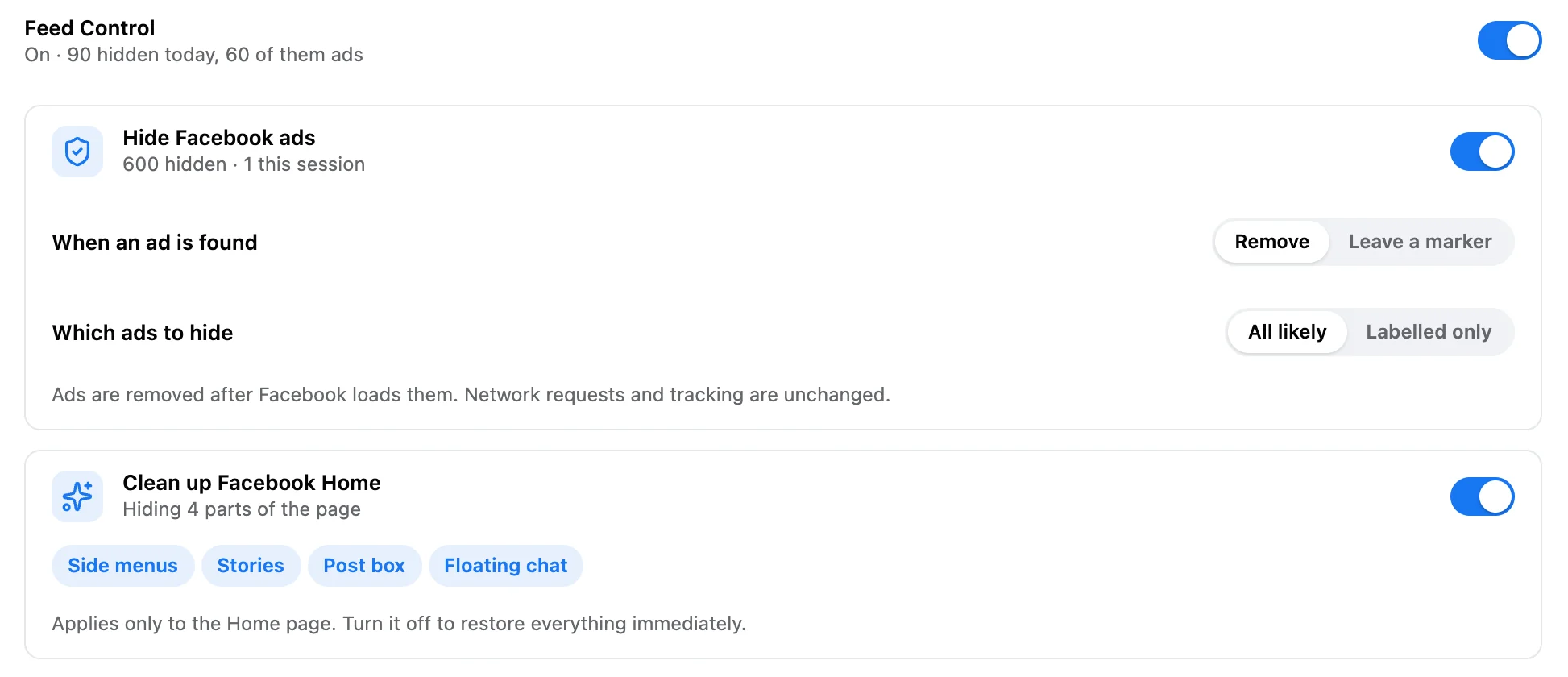
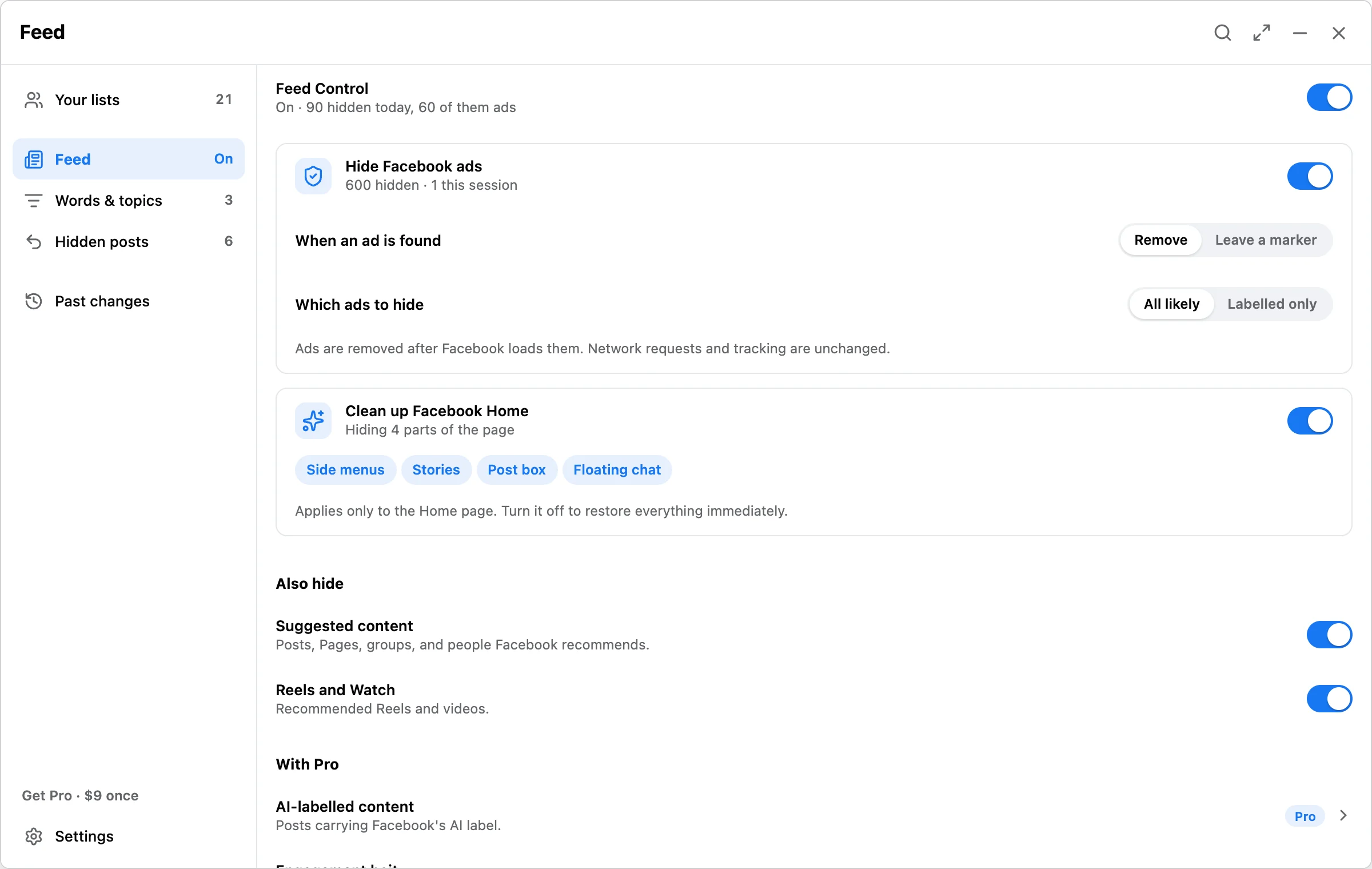
The Feed screen of the extension panel with Feed Control on, Hide Facebook ads on, and Clean up Facebook Home hiding side menus, Stories, the post box, and floating chat.
Feed · Hide ads and clean up Facebook HomeProduction interface, version 0.9.0, illustrative data
  • Ads and clutter, goneHidden in this browser as Facebook loads them. Free, with no limit.
  • Five lists, seventeen actionsGroups, Pages, follows, friends, and sent requests.
  • Reviewed, then runNothing changes until you select items and confirm.
  • Checked on FacebookEach result is verified and written to a local record.

From a noisy feed to a quiet one.

Ads, suggestions, and Reels step aside. Old groups and follows leave when you say so. Every change is written down.

Motion design built from the production interface, version 0.9.0, with illustrative data.

Feed Control · This browser only

Hide the ads. Keep the posts.

Turn it on once. Ads, suggestions, and Reels go as Facebook loads them, the Home page loses the parts you never read, and every post gets one menu for the rest. Nothing about your relationships changes.

Hide Facebook ads

Free · No limit

Detected ads disappear from the Feed, down the side, and in the Reels strip. Remove each ad outright or leave a small marker, match all likely ads or only the labelled ones, and keep one advertiser out with a local block list.

Hide Facebook ads switched on with Remove and All likely selected, and Clean up Facebook Home hiding side menus, Stories, post box, and floating chat.

Clean up Facebook Home

Free

Hide the parts of the Home page you never read. Turn Feed Control off and all of it comes back immediately.

Side menus Stories Post box Floating chat

Hide suggestions and Reels

Free

Remove them outright or leave a small placeholder with Show once.

  • Suggested for you
  • Suggested Pages
  • Suggested groups
  • People You May Know
  • Reels and Watch
  • Only what I follow

Your own words and topics

Free runs 3

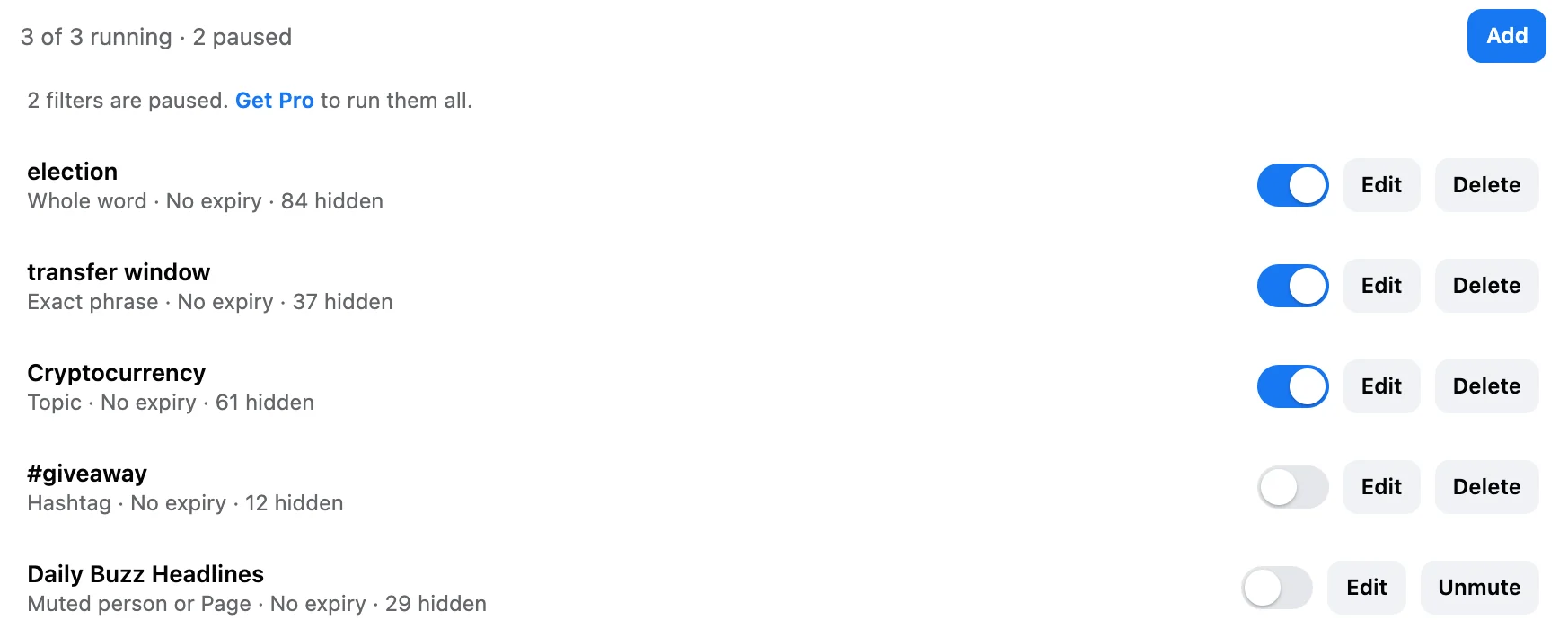
Hide posts by word, phrase, hashtag, domain, source, or topic, with an optional expiry. Save up to 500. Free runs three at a time and the rest wait, paused, in the list.

Words and topics with three filters running (election, transfer window, Cryptocurrency) and two paused.

One menu on every post

Free · New in 0.9.2

One button replaces Facebook's ⋯ and ✕. Hide the post, mute who posted it, hide posts like it by hashtag, site, or word, or highlight the person or Page. Facebook's own options stay inside, and every action shows an Undo.

  • Mute 1 day
  • 7 days
  • 30 days
  • Always

Browse at your pace

Free · New in 0.9.2

J and K move between posts and N jumps to the next one you haven't seen. Posts from an earlier visit fade. Set a daily limit, pause the Feed, or open Facebook to Latest or Friends. Friends and groups stay open.

  • Keyboard shortcuts
  • Focus mode
  • Wide Feed
  • Daily limit
  • Hide counts

Five Pro filters

Pro

For the posts that keep coming back.

  • AI-labelled content
  • Engagement bait
  • Duplicate posts
  • Repeated reshares
  • Comment Shield

Comment Shield reaches the comments under a post, not only the post.

See what was hidden, and why

Free

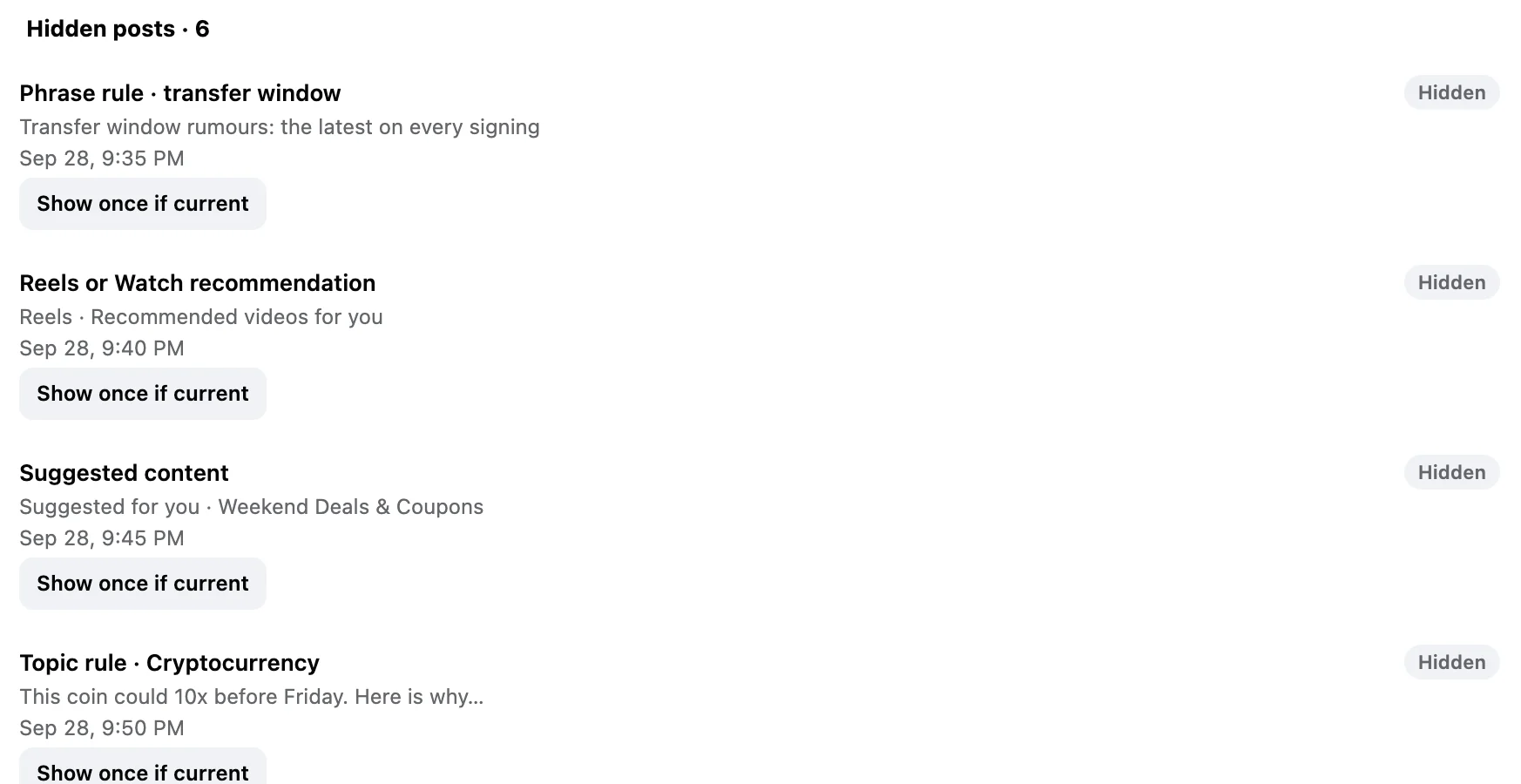
Hidden posts lists every hidden post with its reason. Show a current post once, clear a mute, or turn a filter off.

Hidden posts: a phrase rule, a Reels recommendation, suggested content, and a topic rule, each with Show once if current.

What it is not. Ads and posts are hidden after Facebook has already loaded them, so ad and tracking requests still happen. Hiding a post does not unfollow or unfriend anyone. Read the Feed Control guide.

Reset · Bulk cleanup

Years of groups and follows, cleared on your terms.

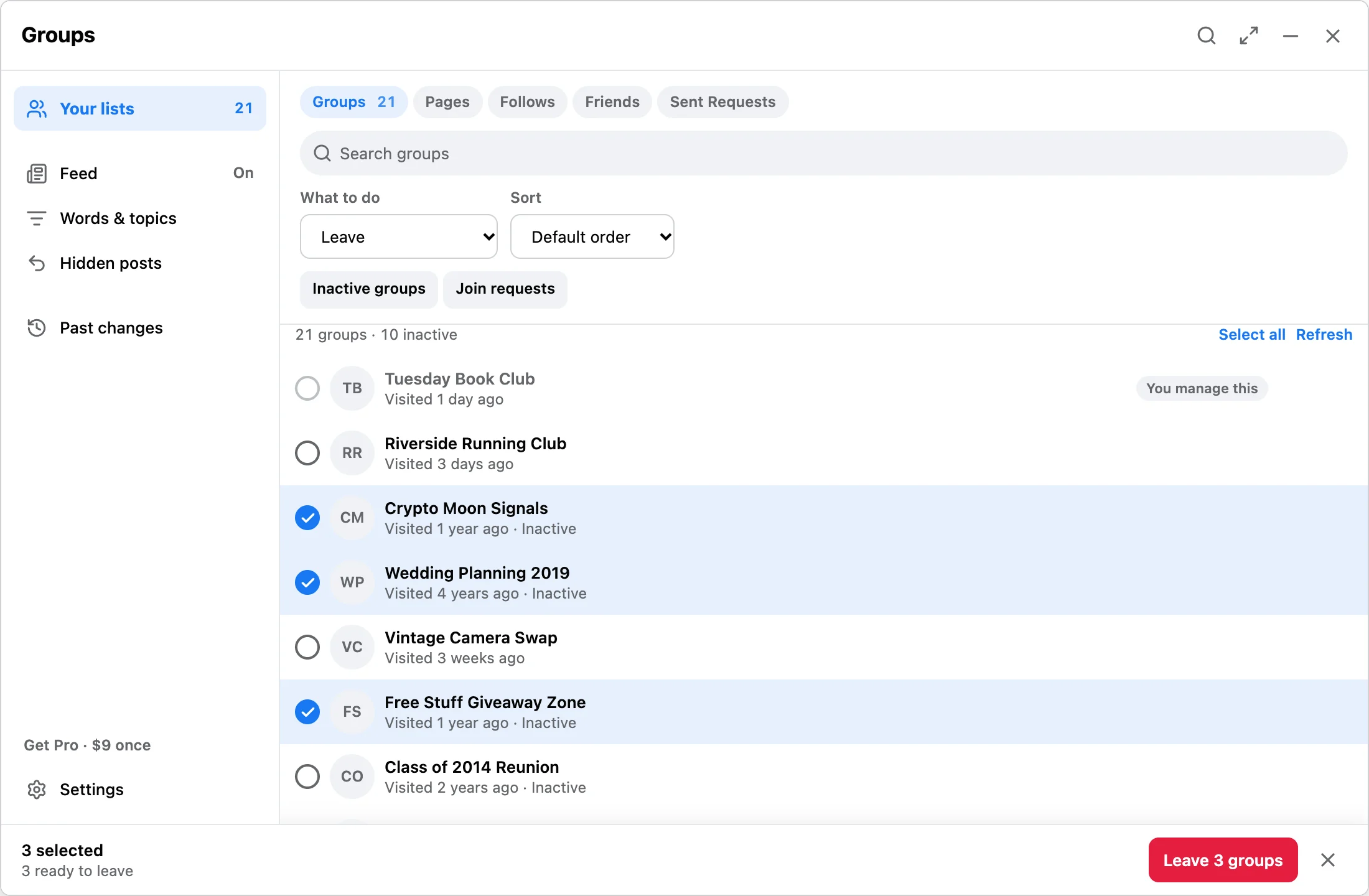
The panel opens on top of Facebook, reads the list you are looking at, and waits. Nothing changes until you select items and confirm, and you can stop at any point.

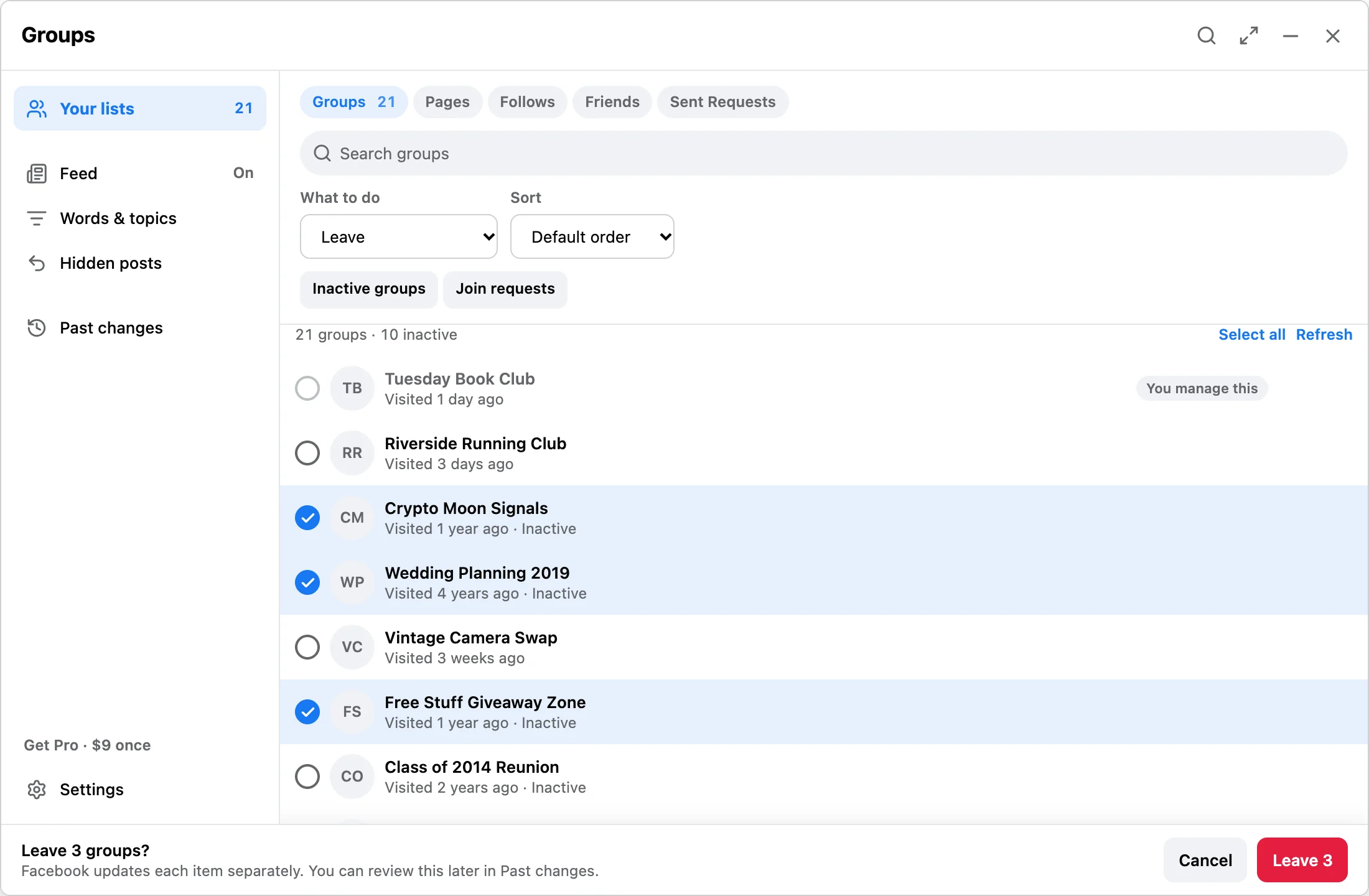
The Groups list with three inactive groups selected: Crypto Moon Signals, Wedding Planning 2019, and Free Stuff Giveaway Zone. The bar reads 3 selected, 3 ready to leave.
Your lists · Three inactive groups selected
The confirmation bar asks Leave 3 groups? and says Facebook updates each item separately, with Cancel and Leave 3 buttons.
Confirm · Nothing runs until you press the button
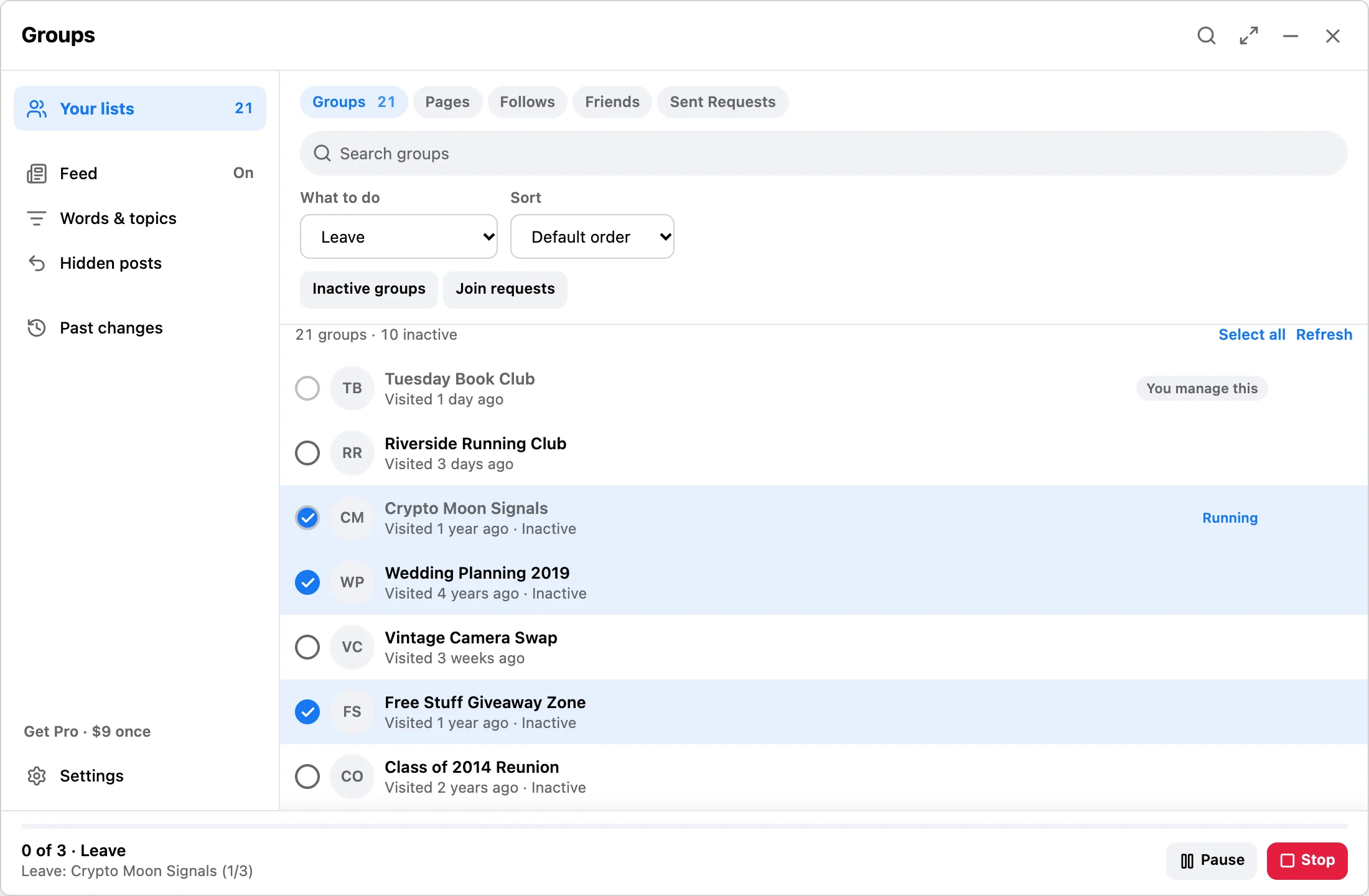
A run in progress: 0 of 3, leaving Crypto Moon Signals, with Pause and Stop buttons.
Running · Pause or stop between items
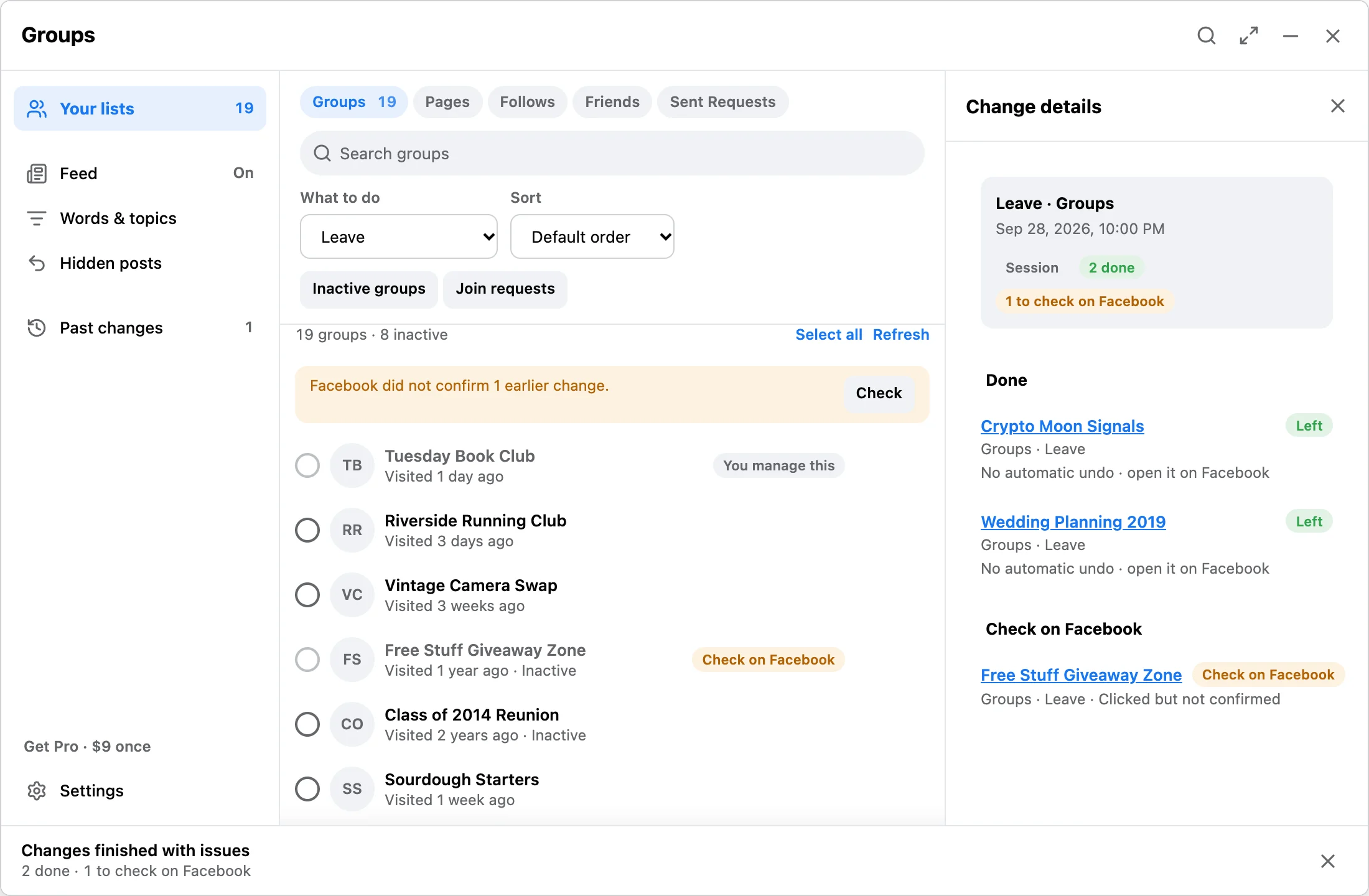
Change details after a run: Crypto Moon Signals and Wedding Planning 2019 left, and Free Stuff Giveaway Zone is listed under Check on Facebook. The session shows 2 done and 1 to check on Facebook.
Change details · Done, and one result to check
What you can do on each list
ListActions
GroupsLeaveCancel join requestUnfollowNotifications: all postsNotifications: highlightsNotifications: friends’ postsNotifications: offPush: highlightsPush: off
PagesUnfollow Page
FollowsUnfollow
FriendsUnfriendRestrictUnrestrictBlockUnblock
Sent requestsCancel request

Past changes · Stays in this browser

Every change leaves a record.

A run writes what each item was before, what was asked, and what Facebook showed afterwards. Past changes keeps all of it on your device, with export.

  • Past runs

    Per-item lines such as “Before: member, following” and “Checked on Facebook: left”. Export as JSON or CSV.

  • Check on Facebook

    Sent but not confirmed. Not failed, and not safe to retry blindly. It may already have changed, so open each one and look. Nothing is retried automatically.

  • Keep

    Items you mark Keep are never selected automatically. Clear the mark from the list itself.

  • Hidden posts

    Every hidden post with its reason, plus muted people. Reveal a post or clear a mute.

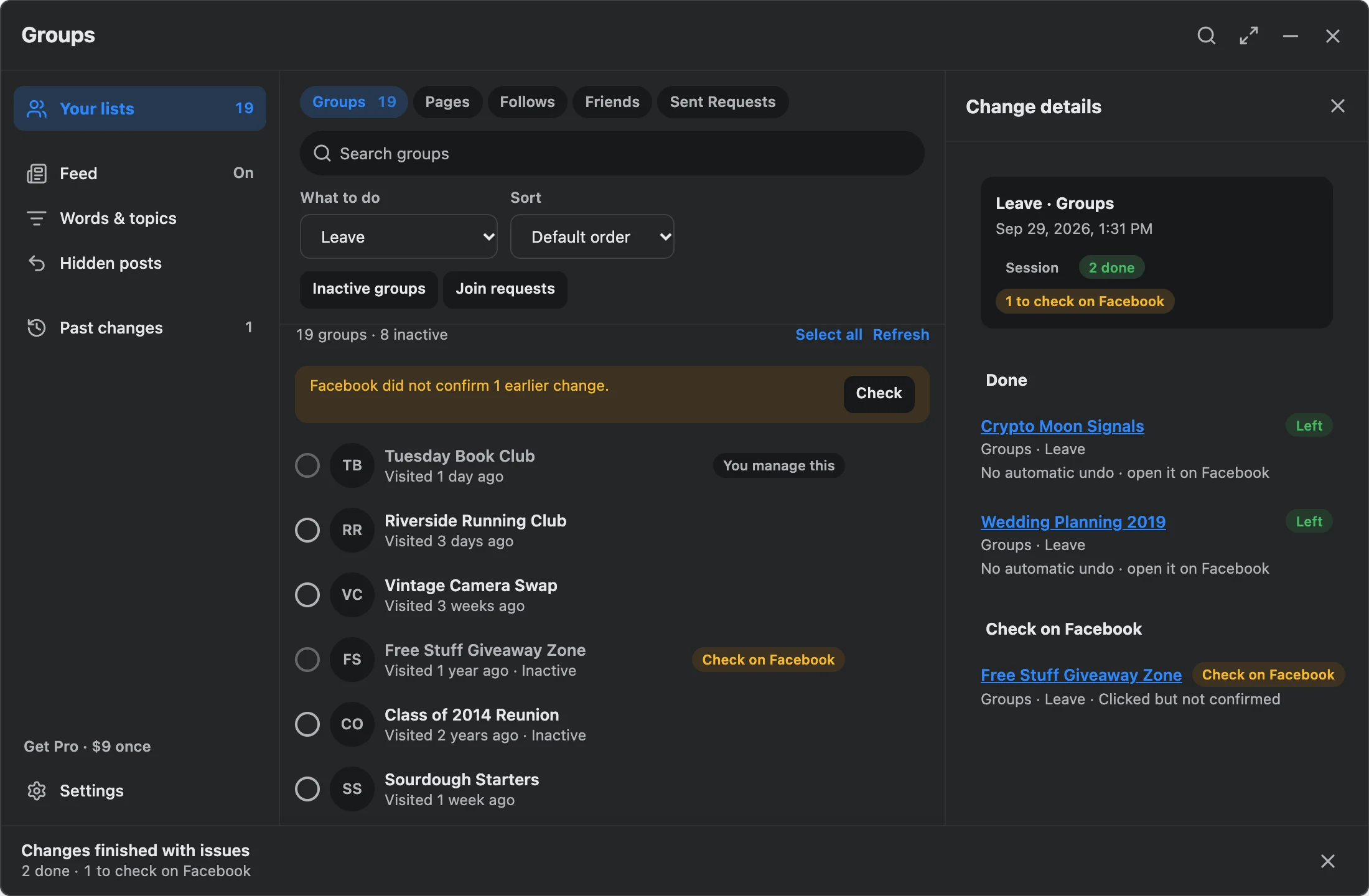
Change details in Facebook dark mode: Crypto Moon Signals and Wedding Planning 2019 left, and Free Stuff Giveaway Zone is listed under Check on Facebook.
Change details · In Facebook dark modeProduction interface, version 0.9.0, illustrative data

Stays on this device

Your lists, selections, feed rules, hidden-post records, and run history live in Chrome storage.

No password

It works inside the Facebook tab you already have open. It never asks for or stores a password.

Diagnostics off by default

Optional operational diagnostics never include Facebook content, names, rules, or URLs. Privacy and safety.

Boundaries

What it does, and what it won’t pretend to.

A small tool that does five jobs carefully. If you need one of the jobs on the right, use a tool built for it.

Does

  • Leaves groups you joined, cancels join requests, unfollows groups, and sets in-app and push group notifications.
  • Unfollows Pages you liked and people or Pages you follow.
  • Unfriends and cancels sent friend requests.
  • Restricts or blocks a friend, and undoes either. Blocking is stronger than unfollowing and does not restore friendship when you unblock.
  • Hides posts locally with built-in filters or your own words and topics, with Show once for current posts.
  • Records every action with what Facebook showed afterwards, exportable.
  • Works from the Facebook tab you have open in desktop Chrome. No password, no login of its own.

Does not

  • Delete posts, comments, photos, or activity log entries.
  • Touch Messenger, Instagram, Threads, or the mobile apps.
  • Remove members from groups you run, or leave groups you admin.
  • Block ads or tracking. Feed Control hides posts after they load.
  • Send requests, follow, join, or grow anything. No automation that acts for you.
  • Guarantee outcomes. No extension can. Run small batches and stop if Facebook warns you.

Full detail on scope and limits and privacy and safety.

Pricing

Finish big cleanups. Keep the Feed quiet.

Hiding ads, cleaning up Facebook Home, hiding suggestions and Reels, muting, and every browsing option stay free. Pro runs the whole reviewed selection, every saved word and topic, and five more Feed filters.

Free

$0forever

Everything you need to quiet the Feed today.

  • Hide Facebook ads, with no limit
  • Clean up Facebook Home, with no limit
  • Hide suggestions and Reels, with no limit
  • Save up to 500 words and topics; run 3 at a time
  • All five lists and all seventeen actions, 10 changes a day
  • Activity sort and quick select on large lists
  • One menu on every post, unlimited mutes, and Undo
  • Keyboard shortcuts, Focus mode, daily limit, and Pause the Feed
  • Placeholders and Show once
  • Hidden posts, Past changes, Check on Facebook, JSON and CSV export
  • Every safety check, pause, stop, and verification
Add to Chrome

From the Chrome Web Store. No account, no email.

Pro

$9once, no subscription

For big cleanups and a Feed that stays quiet.

  • Everything in Free
  • No daily limit: select the whole list and run it
  • Run every word and topic you have saved, not three
  • Pro feed filters: AI-labelled, engagement bait, duplicates, reshares, Comment Shield
  • Comment Shield reaches the comments under a post, not only the post
  • Match topics by meaning on supported Chrome
  • Same safety checks, same pacing, same records as Free
Get Pro, $9 once

Paid through Gumroad. Paste the key into the panel. Pricing details and refunds.

Questions

Straight answers.

What can Facebook Reset clean up?

Groups you joined (leave, cancel a join request, unfollow, set in-app notifications to all posts, highlights, friends' posts, or off, or set push notifications to highlights or off), Pages you liked (unfollow), people and Pages you follow (unfollow), friends (unfriend, restrict, unrestrict, block, or unblock), and sent friend requests (cancel). You select the items, confirm the run, and each result is recorded.

Does Feed Control block ads or tracking?

It hides ads, it does not block them. Feed Control removes ads and hides posts after Facebook has already loaded them in this browser. Ad and tracking requests still happen, and hiding a post does not unfollow or unfriend anyone.

Does any Facebook data leave my browser?

Your lists, selections, feed rules, mutes, posts you've seen, hidden-post records, and run history stay in Chrome storage on this device. Gumroad and the activation service handle payment and license keys only. Optional operational diagnostics are off by default and never include Facebook content. Details on the privacy and safety page.

What does Check on Facebook mean?

The extension sent the action but could not confirm the result on Facebook. The item may already have changed. It is listed under Check on Facebook in Past changes so you can open it and look. Nothing is retried automatically.

What is free and what does Pro add?

Free hides Facebook ads, cleans up the Facebook Home page, hides suggestions and Reels, mutes people and Pages, and includes every browsing option such as keyboard shortcuts, Focus mode, and a daily time limit, all with no limit. It runs 3 of your own words or topics at a time and makes up to 10 changes a day on your lists. Pro is a one-time $9 license: no daily limit, so the whole reviewed selection runs in one pass; every word and topic you have saved runs; and five more feed filters are added, including Comment Shield. Activity sort, quick select, Hidden posts, Past changes, exports, and every safety check are the same on both.

Does it need my Facebook password?

No. It works inside the Facebook tab you already have open in desktop Chrome. It never asks for or stores a password.

Is this the same extension as Bulk Group Leaver?

Yes. Bulk Group Leaver & Facebook Cleanup became Facebook Reset & Feed Control in version 0.7. It is the same Chrome Web Store listing and the same license. Existing Pro keys keep working.

Is it affiliated with Meta or Facebook?

No. It is an independent extension built and maintained by one person. It is not affiliated with, endorsed by, or sponsored by Meta or Facebook.

Two minutes to the first run

Install, open Facebook, press the icon.

The panel opens on your groups list. Select a few, press Leave, watch it happen, read the record. Or press Alt + Shift + F on any Facebook page.